
R21xx-HP FlexFabric 11900 MPLS Configuration Guide


111
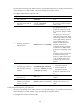
Ste
p
Command
Remarks
8. (Optional.) Allow the local AS
number to appear in the
AS_PATH attribute of a
received route, and set the
maximum number of
repetitions.
peer { group-name | ip-address }
allow-as-loop [ number ]
By default, BGP discards incoming
route updates that contain the local
AS number.
BGP detects routing loops by
examining AS numbers. In a
hub-spoke network where EBGP is
running between a PE and a CE,
the routing information the PE
advertises to a CE carries the AS
number of the PE. Therefore, the
route updates that the PE receives
from the CE also include the AS
number of the PE. This causes the
PE to be unable to receive the route
updates. In this case, you must
configure this command to allow
routing loops.
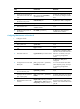
2. Configure the CE:
Ste
p
Command
Remarks
1. Enter system view.
system-view N/A
2. Enter BGP view.
bgp as-number N/A
3. Configure the PE as a BGP
peer.
peer { group-name | ip-address }
as-number as-number
By default, no BGP peer is created.
4. Create and enter BGP IPv4
unicast family view.
ipv4-family [ unicast ] N/A
5. Enable IPv4 unicast route
exchange with the specified
peer or peer group.
peer { group-name | ip-address }
enable
By default, BGP does not exchange
IPv4 unicast routes with any peer.
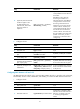
6. (Optional.) Configure route
redistribution.
import-route protocol [ { process-id
| all-processes } [ med med-value |
route-policy route-policy-name ] * ]
A CE must redistribute its routes to
the PE so the PE can advertise them
to the peer CE.
Configuring IBGP between a PE and a CE
Use IBGP between PE and CE only in common MPLS L3VPN networks. In networks such as Extranet,
inter-AS VPN, carrier's carrier, nested VPN, and HoVPN, you cannot use IBGP between PE and CE.
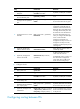
1. Configure the PE:
Ste
p
Command
Remarks
1. Enter system view.
system-view N/A
2. Enter BGP view.
bgp as-number N/A
3. Enter BGP VPN view.
ip vpn-instance vpn-instance-name
Configuration commands in BGP
VPN view are the same as those in
BGP view. For details, see Layer
3—IP Routing Configuration
Guide.