
R21xx-HP FlexFabric 11900 MPLS Configuration Guide

116
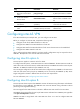
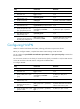
To configure inter-AS option B on an ASBR PE:
Ste
p
Command
Remarks
1. Enter system view.
system-view N/A
2. Enter interface view of the
interface connecting to the
remote ASBR-PE.
interface interface-type
interface-number
N/A
3. Configure the IP address of
the interface.
ip address ip-address { mask |
mask-length }
N/A
4. Return to system view.
quit N/A
5. Enter BGP view. bgp as-number N/A
6. Enter BGP-VPNv4 address
family view.
ipv4-family vpnv4 N/A
7. Disable route target based
filtering of VPNv4 routes.
undo policy vpn-target
By default, the PE filters received
VPNv4 routes by route targets.
The routes surviving the filtering
are added to the routing table, and
the others are discarded.
Configuring inter-AS option C
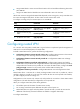
To configure inter-AS option C, perform configurations on PEs and ASBR PEs, and configure routing
policies on the ASBR PEs.
Configuring a PE
Establish an ordinary IBGP peer relationship between a PE and an ASBR PE in an AS, and an MP-EBGP
peer relationship between PEs of different ASs.
The PEs and ASBR PEs in an AS must be able to exchange labeled IPv4 routes.
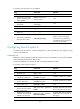
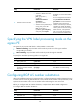
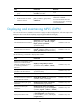
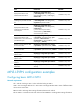
To configure a PE for inter-AS option C:
Ste
p
Command
Remarks
1. Enter system view. system-view N/A
2. Enter BGP view.
bgp as-number N/A
3. Configure the ASBR PE in the
same AS as an IBGP peer.
peer { group-name | ip-address }
as-number as-number
By default, no BGP peer is created.
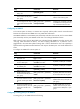
4. Configure the PE of another
AS as an EBGP peer.
peer { group-name | ip-address }
as-number as-number
By default, no BGP peer is created.
5. Enter BGP IPv4 unicast
address family view.
ipv4-family [ unicast ] N/A
6. Enable the PE to exchange
IPv4 unicast routes with the
peer or peer group.
peer { group-name | ip-address }
enable
By default, BGP does not exchange
IPv4 unicast routes with any peer.
7. Enable the PE to exchange
labeled IPv4 routes with the
ASBR PE in the same AS.
peer { group-name | ip-address }
label-route-capability
By default, BGP does not advertise
labeled routes to any IPv4 peer or
peer group.
8. Return to BGP view.
quit N/A