
R21xx-HP FlexFabric 11900 MPLS Configuration Guide

119
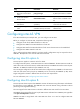
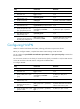
Ste
p
Command
Remarks
1. Enter system view. system-view N/A
2. Enter BGP view.
bgp as-number N/A
3. Enter BGP-VPN VPNv4
address family view.
ipv4-family vpnv4 N/A
4. Enable nested VPN.
nesting-vpn By default, nested VPN is disabled.
5. Return to BGP view.
quit N/A
6. Enter BGP-VPN view. ip vpn-instance vpn-instance-name
N/A
7. Specify the peer CE or the
peer group of the peer CE.
peer { group-name |
peer-address } as-number
as-number
By default, no peer is specified.
8. Enter BGP-VPN VPNv4
address family view.
ipv4-family vpnv4
N/A
9. Enable BGP VPNv4 route
exchange with the peer CE or
the peer group of the peer CE.
peer { group-name |
peer-address } enable
By default, BGP does not exchange
VPNv4 routes with any peer.
Configuring HoVPN
HoVPN is suited to build hierarchical VPNs, reducing performance requirements for PEs.
Before you configure HoVPN, complete basic MPLS L3VPN settings on UPE and SPE.
Do not configure the peer default-route-advertise vpn-instance and peer upe route-policy commands at
the same time.
Do not connect an SPE to a CE directly. If an SPE must be directly connected to a CE, the VPN instance
on the SPE and that on the UPE must be configured with different RDs.
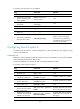
To configure HoVPN:
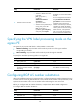
Ste
p
Command
Remarks
1. Enter system view. system-view N/A
2. Enter BGP view.
bgp as-number N/A
3. Specify a BGP peer or peer
group.
peer { group-name |
peer-address } as-number
as-number
By default, no BGP peer is
specified.
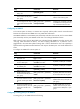
4. Enter BGP-VPN VPNv4
address family view.
ipv4-family vpnv4 N/A
5. Enable BGP-VPNv4 route
exchange with the peer or
peer group.
peer { group-name | ip-address }
enable
By default, BGP does not exchange
VPNv4 routes with any peer.
6. Specify the BGP peer or peer
group as a UPE.
peer { group-name | ip-address }
upe
By default, no peer is a UPE.