
R21xx-HP FlexFabric 11900 MPLS Configuration Guide



8
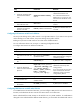
Ste
p
Command
Remarks
2. Create a RIP process for a
VPN instance and enter RIP
view.
rip [ process-id ] vpn-instance
vpn-instance-name
Perform this configuration on the
MCE. On the VPN site, create a
normal RIP process.
3. Enable RIP on the interface
attached to the specified
network.
network network-address
By default, RIP is disabled on an
interface.
4. Redistribute remote site routes
advertised by the PE.
import-route protocol [ process-id
| all-processes | allow-ibgp ] [ cost
cost | route-policy
route-policy-name | tag tag ] *
By default, no route is redistributed
into RIP.
5. (Optional.) Configure the
default cost value for the
redistributed routes.
default cost value
If you do not specify a default cost
value, the default cost value is 0.
Configuring OSPF between an MCE and a VPN site
An OSPF process can belong to a single VPN instance. If you create an OSPF process without binding
it to a VPN instance, the process belongs to the public network.
Binding OSPF processes to VPN instances can isolate routes of different VPNs.
For more information about OSPF, see Layer 3—IP Routing Configuration Guide.
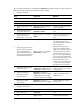
To configure OSPF between an MCE and a VPN site:
Ste
p
Command
Remarks
1. Enter system view.
system-view N/A
2. Create an OSPF process for a
VPN instance and enter OSPF
view.
ospf [ process-id | router-id
router-id | vpn-instance
vpn-instance-name ] *
Perform this configuration on the
MCE. On the VPN site, create a
normal OSPF process.
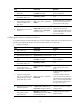
An OSPF process that is bound
with a VPN instance does not use
the public network router ID
configured in system view.
Therefore, you must configure a
router ID when starting the OSPF
process.
An OSPF process can belong to
only one VPN instance, but one
VPN instance can use multiple
OSPF processes to advertise VPN
routes.