
R21xx-HP FlexFabric 11900 MPLS Configuration Guide

134
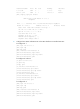
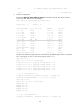
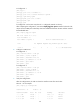
10.1.1.1/32 Direct 0 0 127.0.0.1 InLoop0
10.1.1.255/32 Direct 0 0 10.1.1.1 Vlan12
10.2.1.0/24 BGP 255 0 10.1.1.2 Vlan12
127.0.0.0/8 Direct 0 0 127.0.0.1 InLoop0
127.0.0.0/32 Direct 0 0 127.0.0.1 InLoop0
127.0.0.1/32 Direct 0 0 127.0.0.1 InLoop0
127.255.255.255/32 Direct 0 0 127.0.0.1 InLoop0
224.0.0.0/4 Direct 0 0 0.0.0.0 NULL0
224.0.0.0/24 Direct 0 0 0.0.0.0 NULL0
255.255.255.255/32 Direct 0 0 127.0.0.1 InLoop0
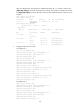
# CE 1 and CE 2 can ping each other. Take CE 1 as an example:
[CE1] ping 10.2.1.1
PING 10.2.1.1 (10.2.1.1): 56 data bytes
56 bytes from 10.2.1.1: icmp_seq=0 ttl=254 time=5.000 ms
56 bytes from 10.2.1.1: icmp_seq=1 ttl=254 time=2.000 ms
56 bytes from 10.2.1.1: icmp_seq=2 ttl=254 time=3.000 ms
56 bytes from 10.2.1.1: icmp_seq=3 ttl=254 time=1.000 ms
56 bytes from 10.2.1.1: icmp_seq=4 ttl=254 time=2.000 ms
--- 10.2.1.1 ping statistics ---
5 packet(s) transmitted, 5 packet(s) received, 0.0% packet loss
round-trip min/avg/max/stddev = 1.000/2.600/5.000/1.356 ms
Configuring MPLS L3VPN inter-AS option A
Network requirements
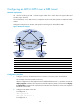
CE 1 and CE 2 belong to the same VPN. CE 1 accesses the network through PE 1 in AS 100, and CE
2 accesses the network through PE 2 in AS 200.
Configure MPLS L3VPN inter-AS option A, and use the VRF-to-VRF method to manage VPN routes.
Run OSPF on the MPLS backbone in each AS.