
R21xx-HP FlexFabric 11900 MPLS Configuration Guide
137
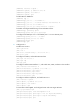
[CE2-Vlan-interface12] ip address 10.2.1.1 24
[CE2-Vlan-interface12] quit
# Configure PE 2.
[PE2] ip vpn-instance vpn1
[PE2-vpn-instance] route-distinguisher 200:2
[PE2-vpn-instance] vpn-target 100:1 both
[PE2-vpn-instance] quit
[PE2] interface vlan-interface 12
[PE2-Vlan-interface12] ip binding vpn-instance vpn1
[PE2-Vlan-interface12] ip address 10.2.1.2 24
[PE2-Vlan-interface12] quit
# On ASBR PE 1, create a VPN instance, and bind the instance to the interface connected to ASBR
PE 2. (ASBR PE 1 considers ASBR PE 2 its CE.)
[ASBR-PE1] ip vpn-instance vpn1
[ASBR-PE1-vpn-instance-vpn1] route-distinguisher 100:1
[ASBR-PE1-vpn-instance-vpn1] vpn-target 100:1 both
[ASBR-PE1-vpn-instance-vpn1] quit
[ASBR-PE1] interface vlan-interface 12
[ASBR-PE1-Vlan-interface12] ip binding vpn-instance vpn1
[ASBR-PE1-Vlan-interface12] ip address 192.1.1.1 24
[ASBR-PE1-Vlan-interface12] quit
# On ASBR PE 2, create a VPN instance, and bind the instance to the interface connected to ASBR
PE 1. (ASBR PE 2 considers ASBR PE 1 its CE.)
[ASBR-PE2] ip vpn-instance vpn1
[ASBR-PE2-vpn-vpn-vpn1] route-distinguisher 200:1
[ASBR-PE2-vpn-vpn-vpn1] vpn-target 100:1 both
[ASBR-PE2-vpn-vpn-vpn1] quit
[ASBR-PE2] interface vlan-interface 12
[ASBR-PE2-Vlan-interface12] ip binding vpn-instance vpn1
[ASBR-PE2-Vlan-interface12] ip address 192.1.1.2 24
[ASBR-PE2-Vlan-interface12] quit
After completing the configurations, you can view the VPN instance configurations by issuing the
display ip vpn-instance command.
The PEs can ping the CEs, and the ASBR PEs can ping each other.
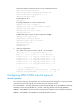
4. Establish EBGP peer relationships between PEs and CEs, and redistribute VPN routes into BGP:
# Configure CE 1.
[CE1] bgp 65001
[CE1-bgp] peer 10.1.1.2 as-number 100
[CE1-bgp] ipv4-family unicast
[CE1-bgp-ipv4] peer 10.1.1.2 enable
[CE1-bgp-ipv4] import-route direct
[CE1-bgp-ipv4] quit
[CE1-bgp] quit
# Configure PE 1.
[PE1] bgp 100
[PE1-bgp] ip vpn-instance vpn1
[PE1-bgp-vpn1] peer 10.1.1.1 as-number 65001