
R21xx-HP FlexFabric 11900 MPLS Configuration Guide

159
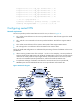
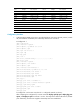
CE 1 Loop0 2.2.2.9/32
CE 2
Loop0
5.5.5.9/32
Vlan-int2 10.1.1.2/24 Vlan-int1 21.1.1.2/24
Vlan-int1 11.1.1.1/24
Vlan-int2
20.1.1.1/24
CE 3 Vlan-int1 100.1.1.1/24
CE 4
Vlan-int1
120.1.1.1/24
CE 5 Vlan-int3 110.1.1.1/24 CE 6 Vlan-int3 130.1.1.1/24
PE 1 Loop0 3.3.3.9/32
PE 2
Loop0
4.4.4.9/32
Vlan-int1 11.1.1.2/24
Vlan-int1
21.1.1.1/24
Vlan-int2 30.1.1.1/24 Vlan-int2 30.1.1.2/24
PE 3 Loop0 1.1.1.9/32
PE 4
Loop0
6.6.6.9/32
Vlan-int1 100.1.1.2/24
Vlan-int1
120.1.1.2/24
Vlan-int2 10.1.1.1/24 Vlan-int2 20.1.1.2/24
Vlan-int3 110.1.1.2/24
Vlan-int3
130.1.1.2/24
Configuration procedure
1. Configure MPLS L3VPN on the service provider backbone. Use IS-IS as the IGP protocol, enable
LDP, and establish an MP-IBGP peer relationship between PE 1 and PE 2:
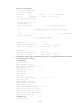
# Configure PE 1.
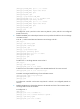
<PE1> system-view
[PE1] interface loopback 0
[PE1-LoopBack0] ip address 3.3.3.9 32
[PE1-LoopBack0] quit
[PE1] mpls lsr-id 3.3.3.9
[PE1] mpls ldp
[PE1-ldp] quit
[PE1] isis 1
[PE1-isis-1] network-entity 10.0000.0000.0000.0004.00
[PE1-isis-1] quit
[PE1] interface loopback 0
[PE1-LoopBack0] isis enable 1
[PE1-LoopBack0] quit
[PE1] interface vlan-interface 2
[PE1-Vlan-interface2] ip address 30.1.1.1 24
[PE1-Vlan-interface2] isis enable 1
[PE1-Vlan-interface2] mpls enable
[PE1-Vlan-interface2] mpls ldp enable
[PE1-Vlan-interface2] quit
[PE1] bgp 100
[PE1-bgp] peer 4.4.4.9 as-number 100
[PE1-bgp] peer 4.4.4.9 connect-interface loopback 0
[PE1-bgp] ipv4-family vpnv4
[PE1-bgp-vpnv4] peer 4.4.4.9 enable
[PE1-bgp-vpnv4] quit
[PE1-bgp] quit
# Configure PE 2 in the same way that PE 1 is configured. (Details not shown.)
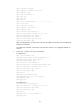
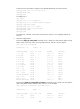
After completing the configurations, execute commands display mpls ldp peer, display bgp peer
vpnv4, and display isis peer on either PE 1 or PE 2. The output shows that the LDP session, the BGP
peer relationship, and the IS-IS neighbor relationship have been established.