
R21xx-HP FlexFabric 11900 MPLS Configuration Guide



11
carry the OSPF domain ID by configuring the domain-id command in OSPF view. The domain ID is
added to BGP VPN routes as an extended community attribute.
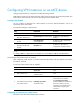
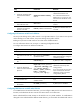
1. Configure the MCE:
Ste
p
Command
Remarks
1. Enter system view.
system-view N/A
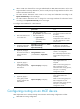
2. Enter BGP view.
bgp as-number N/A
3. Enter BGP-VPN instance view.
ip vpn-instance vpn-instance-name
N/A
4. Specify an EBGP peer or peer
group.
peer { group-name | ip-address }
as-number as-number
By default, no BGP peer or peer
group is specified.
5. Create and enter BGP-VPN
IPv4 address family view.
ipv4-family [ unicast ] N/A
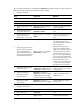
6. Enable exchange of IPv4
unicast routes with the
specified peer or peer group.
peer { group-name | ip-address }
enable
BGP cannot exchange IPv4 unicast
routes with any peer or peer
group.
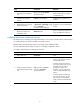
7. Allow routing loops: allow the
local AS number to appear in
the AS_PATH attribute of
routes received from the peer
or peer group and specify the
maximum appearance times.
peer { group-name | ip-address }
allow-as-loop [ number ]
By default, the local AS number is
not allowed to appear in the
AS_PATH attribute of routes from a
peer or peer group.
BGP checks routing loops by
examining AS numbers. When
EBGP is used, the MCE advertises
routing information carrying the
local AS number to the site and
then receives routing updates from
the site. The routing updates carry
the AS number of the MCE, so the
MCE discards them to avoid
routing loops. To enable the MCE
to receive such routes, configure
the MCE to allow routing loops.
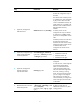
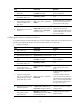
8. Redistribute remote site routes
advertised by the PE.
import-route protocol [ { process-id
| all-processes } [ med med-value |
route-policy route-policy-name ] * ]
By default, BGP does not
redistribute routes from any other
routing protocol.
9. (Optional.) Configure a
filtering policy to filter
advertised routes.
filter-policy { acl-number |
prefix-list ip-prefix-name } export
[ direct | isis process-id | ospf
process-id | rip process-id | static ]
By default, BGP does not filter
advertised routes.
10. (Optional.) Configure a
filtering policy to filter
received routes.
filter-policy { acl-number |
prefix-list ip-prefix-name } import
By default, BGP does not filter
received routes.
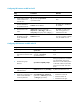
2. Configure the VPN site:
Ste
p
Command
Remarks
1. Enter system view.
system-view N/A
2. Enable BGP and enter BGP
view.
bgp as-number By default, BGP is disabled.