
R21xx-HP FlexFabric 11900 MPLS Configuration Guide
164
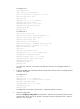
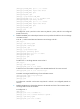
# Allow the local AS number to appear in the AS-PATH attribute of the routes received.
[PE3-bgp-vpnv4] peer 2.2.2.9 allow-as-loop 2
[PE3-bgp-vpnv4] quit
[PE3-bgp] quit
# Configure CE 1.
[CE1] bgp 200
[CE1-bgp] peer 1.1.1.9 as-number 200
[CE1-bgp] peer 1.1.1.9 connect-interface loopback 0
[CE1-bgp] ipv4-family vpnv4
[CE1-bgp-vpnv4] peer 1.1.1.9 enable
[CE1-bgp-vpnv4] undo policy vpn-target
[CE1-bgp-vpnv4] quit
[CE1-bgp] quit
# Configure PE 4 and CE 2 in the same way that PE 3 and CE 1 are configured. (Details not
shown.)
7. Verify the configurations:
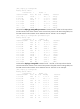
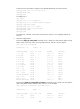
Execute the display ip routing-table command on PE 1 and PE 2 to verify that the public routing
tables contain only routes on the service provider network. Take PE 1 as an example:
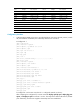
[PE1] display ip routing-table
Destinations : 15 Routes : 15
Destination/Mask Proto Pre Cost NextHop Interface
0.0.0.0/32 Direct 0 0 127.0.0.1 InLoop0
3.3.3.9/32 Direct 0 0 127.0.0.1 InLoop0
4.4.4.9/32 ISIS 15 10 30.1.1.2 Vlan2
30.1.1.0/24 Direct 0 0 30.1.1.1 Vlan2
30.1.1.0/32 Direct 0 0 30.1.1.1 Vlan2
30.1.1.1/32 Direct 0 0 127.0.0.1 InLoop0
30.1.1.255/32 Direct 0 0 30.1.1.1 Vlan2
30.1.1.2/32 Direct 0 0 30.1.1.2 Vlan2
127.0.0.0/8 Direct 0 0 127.0.0.1 InLoop0
127.0.0.0/32 Direct 0 0 127.0.0.1 InLoop0
127.0.0.1/32 Direct 0 0 127.0.0.1 InLoop0
127.255.255.255/32 Direct 0 0 127.0.0.1 InLoop0
224.0.0.0/4 Direct 0 0 0.0.0.0 NULL0
224.0.0.0/24 Direct 0 0 0.0.0.0 NULL0
255.255.255.255/32 Direct 0 0 127.0.0.1 InLoop0
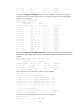
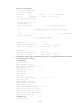
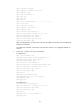
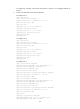
# Execute the display ip routing-table vpn-instance command on PE 1 and PE 2 to verify that the
VPN routing tables contain sub-VPN routes. Take PE 1 as an example:
[PE1] display ip routing-table vpn-instance vpn1
Destinations : 9 Routes : 9
Destination/Mask Proto Pre Cost NextHop Interface
0.0.0.0/32 Direct 0 0 127.0.0.1 InLoop0
11.1.1.0/24 Direct 0 0 11.1.1.1 Vlan1