
R21xx-HP FlexFabric 11900 MPLS Configuration Guide


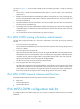

183
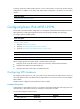
Ste
p
Command
Remarks
2. Create a VPN instance and
enter VPN instance view.
ip vpn-instance vpn-instance-name
By default, no VPN instance is
created.
3. Configure an RD for the VPN
instance.
route-distinguisher
route-distinguisher
By default, no RD is specified.
4. (Optional.) Configure a
description for the VPN
instance.
description text
By default, no description is
configured for a VPN instance.
The description should contain the
VPN instance's related
information, such as its relationship
with a certain VPN.
Associating a VPN instance with an interface
After creating and configuring a VPN instance, associate the VPN instance with the interface connected
to the CE.
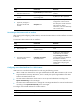
To associate a VPN instance with an interface:
Ste
p
Command
Remarks
1. Enter system view. system-view N/A
2. Enter interface view.
interface interface-type
interface-number
N/A
3. Associate a VPN instance
with the interface.
ip binding vpn-instance
vpn-instance-name
By default, no VPN instance is
associated with an interface.
The ip binding vpn-instance
command clears the IP address of
the interface. Therefore,
re-configure an IP address for the
interface after configuring this
command.
Configuring route related attributes for a VPN instance
VPN routes are controlled and advertised on a PE using the following process:
• When a VPN route learned from a CE gets redistributed into BGP, BGP associates it with a route
target extended community attribute list, which is usually the export target attribute of the VPN
instance associated with the CE.
• The VPN instance determines which routes it can accept and redistribute according to the
import-extcommunity in the route target.
• The VPN instance determines how to change the route target attributes for routes to be advertised
according to the export-extcommunity in the route target.
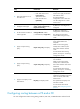
To configure route related attributes for a VPN instance:
Ste
p
Command
Remarks
1. Enter system view.
system-view N/A