
R21xx-HP FlexFabric 11900 MPLS Configuration Guide


184
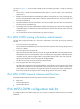
Ste
p
Command
Remarks
2. Enter VPN instance view or
IPv6 VPN view.
• Enter VPN instance view:
ip vpn-instance
vpn-instance-name
• Enter IPv6 VPN view:
ipv6-family
Configurations made in VPN
instance view apply to both IPv4
VPN and IPv6 VPN.
IPv6 VPN prefers the
configurations in IPv6 VPN view
over the configurations in VPN
instance view.
3. Configure route targets.
vpn-target vpn-target&<1-8>
[ both | export-extcommunity |
import-extcommunity ]
By default, no route targets are
configured.
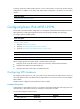
4. Set the maximum number of
routes supported.
routing-table limit number
{ warn-threshold | simply-alert }
By default, no route limit is
configured for a VPN instance.
This setting prevents a VPN
instance from storing too many
routes.
5. Apply an import routing
policy.
import route-policy route-policy
By default, all routes matching the
import target attribute are
accepted.
Make sure the routing policy
already exists. Otherwise, the
device does not filter received
routes.
For information about routing
policies, see Layer 3—IP Routing
Configuration Guide.
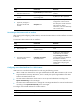
6. Apply an export routing
policy.
export route-policy route-policy
By default, routes to be advertised
are not filtered.
Make sure the routing policy
already exists. Otherwise, the
device does not filter routes to be
advertised.
For information about routing
policies, see Layer 3—IP Routing
Configuration Guide.
7. Apply a tunnel policy to the
VPN instance.
tnl-policy tunnel-policy-name
By default, only one tunnel is
selected (no load balancing) in this
order: LSP tunnel, GRE tunnel,
CR-LSP tunnel.
The specified tunnel policy must
have been created.
For information about tunnel
policies, see "Configuring tunnel
polic
ies."
Configuring routing between a PE and a CE
You can configure IPv6 static routing, RIPng, OSPFv3, IPv6 IS-IS, or EBGP between a PE and a CE.