
R21xx-HP FlexFabric 11900 MPLS Configuration Guide

186
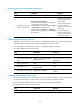
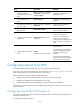
Ste
p
Command
Remarks
2. Create an OSPFv3 process for
a VPN instance and enter
OSPFv3 view.
ospfv3 [ process-id ] vpn-instance
vpn-instance-name
Perform this configuration on the
PE. On the CE, create a common
OSPF process.
The maximum number of OSPFv3
processes for a VPN instance
depends on the device model.
Deleting a VPN instance also
deletes all related OSPFv3
processes.
3. Set the router ID.
router-id router-id N/A
4. Return to system view.
quit
N/A
5. Enter interface view.
interface interface-type
interface-number
N/A
6. Enable OSPFv3 on the
interface.
ospfv3 process-id area area-id
[ instance instance-id ]
By default, OSPFv3 is disabled on
an interface.
Perform this configuration on the
PE.
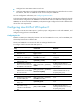
Configuring IPv6 IS-IS between a PE and a CE
An IPv6 IS-IS process belongs to the public network or a single VPN instance. If you create an IPv6 IS-IS
process without binding it to a VPN instance, the process belongs to the public network.
For more information about IPv6 IS-IS, see Layer 3—IP Routing Configuration Guide.
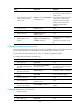
To configure IPv6 IS-IS between a PE and a CE:
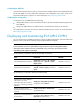
Ste
p
Command
Remarks
1. Enter system view.
system-view N/A
2. Create an IPv6 IS-IS process
for a VPN instance and enter
IS-IS view.
isis [ process-id ] vpn-instance
vpn-instance-name
Perform this configuration on the
PE. On the CE, create a common
IPv6 IS-IS process.
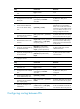
3. Configure a network entity
title for the IS-IS process.
network-entity net By default, no NET is configured.
4. Enable IPv6 for the IS-IS
process.
ipv6 enable IPv6 is disabled by default.
5. Return to system view. quit N/A
6. Enter interface view.
interface interface-type
interface-number
N/A
7. Enable IPv6 for the IS-IS
process on the interface.
isis ipv6 enable [ process-id ]
IPv6 is disabled on an interface by
default.
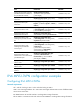
Configuring EBGP between a PE and a CE
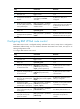
1. Configure the PE:
Ste
p
Command
Remarks
1. Enter system view. system-view N/A