
R21xx-HP FlexFabric 11900 MPLS Configuration Guide



14
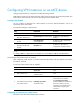
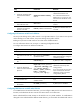
Configuring RIP between an MCE and a PE
Ste
p
Command
Remarks
1. Enter system view.
system-view N/A
2. Create a RIP process for
a VPN instance and
enter RIP view.
rip [ process-id ] vpn-instance
vpn-instance-name
N/A
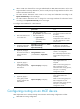
3. Enable RIP on the
interface attached to
the specified network.
network network-address
By default, RIP is disabled on
an interface.
4. Redistribute the VPN
routes.
import-route protocol [ process-id |
all-processes | allow-ibgp ] [ cost cost |
route-policy route-policy-name | tag tag ] *
By default, no route of any
other routing protocol is
redistributed into RIP.
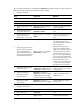
5. (Optional.) Configure
the default cost value
for the redistributed
routes.
default cost value
If you do not specify a default
cost, the default cost is 0.
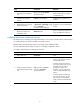
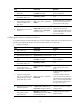
Configuring OSPF between an MCE and a PE
Ste
p
Command
Remarks
1. Enter system view.
system-view N/A
2. Create an OSPF process for a
VPN instance and enter OSPF
view.
ospf [ process-id | router-id
router-id | vpn-instance
vpn-instance-name ] *
N/A
3. Disable routing loop
detection.
vpn-instance-capability simple
Routing loop detection is enabled.
You must disable routing loop
detection for a VPN OSPF process
on the MCE. Otherwise, the MCE
cannot receive OSPF routes from
the PE.
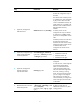
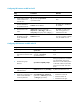
4. (Optional.) Configure the
OSPF domain ID.
domain-id domain-id [ secondary ]
By default, the domain ID is 0.
5. (Optional.) Configure the type
codes of OSPF extended
community attributes.
ext-community-type { domain-id
type-code1 | router-id type-code2
| route-type type-code3 }
The defaults are as follows:
• 0x0005 for Domain ID.
• 0x0107 for Router ID.
• 0x0306 for Route Type.