
R21xx-HP FlexFabric 11900 MPLS Configuration Guide
201
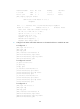
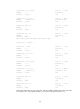
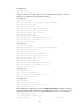
# Configure PE 2.
<PE2> system-view
[PE2] mpls lsr-id 2.2.2.9
3. Configure VPN instances on PEs to allow CE access, and apply tunnel policies to the VPN
instances to use a GRE tunnel for VPN packet forwarding:
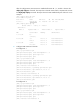
# Configure PE 1.
[PE1] tunnel-policy gre1
[PE1-tunnel-policy-gre1] select-seq gre load-balance-number 1
[PE1-tunnel-policy-gre1] quit
[PE1] ip vpn-instance vpn1
[PE1-vpn-instance-vpn1] route-distinguisher 100:1
[PE1-vpn-instance-vpn1] vpn-target 100:1 both
[PE1-vpn-instance-vpn1] tnl-policy gre1
[PE1-vpn-instance-vpn1] quit
[PE1] interface vlan-interface 12
[PE1-Vlan-interface12] ip binding vpn-instance vpn1
[PE1-Vlan-interface12] ipv6 address 2001:1::2 96
[PE1-Vlan-interface12] quit
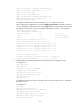
# Configure PE 2.
[PE2] tunnel-policy gre1
[PE2-tunnel-policy-gre1] select-seq gre load-balance-number 1
[PE2-tunnel-policy-gre1] quit
[PE2] ip vpn-instance vpn1
[PE2-vpn-instance-vpn1] route-distinguisher 100:2
[PE2-vpn-instance-vpn1] vpn-target 100:1 both
[PE2-vpn-instance-vpn1] tnl-policy gre1
[PE2-vpn-instance-vpn1] quit
[PE2] interface vlan-interface 11
[PE2-Vlan-interface11] ip binding vpn-instance vpn1
[PE2-Vlan-interface11] ipv6 address 2001:2::2 96
[PE2-Vlan-interface11] quit
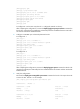
# Configure CE 1.
<CE1> system-view
[CE1] interface vlan-interface 12
[CE1-Vlan-interface12] ipv6 address 2001:1::1 96
[CE1-Vlan-interface12] quit
# Configure CE 2.
<CE2> system-view
[CE2] interface vlan-interface 11
[CE2-Vlan-interface11] ipv6 address 2001:2::1 96
[CE2-Vlan-interface11] quit
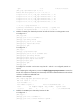
After completing the configurations, execute the display ip vpn-instance command on the PEs to
view the configuration of the VPN instance. Use the ping command to test connectivity between the
PEs and their attached CEs. The PEs can ping their attached CEs. Take PE 1 as an example:
[PE1] display ip vpn-instance
Total VPN-Instances configured : 1
VPN-Instance Name RD Create time