
R21xx-HP FlexFabric 11900 MPLS Configuration Guide
202
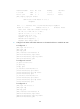
vpn1 100:1 2012/02/13 15:59:50
[PE1] ping -vpn-instance vpn1 2001:1::1
PING6(104=40+8+56 bytes) 2001:1::2 --> 2001:1::1
56 bytes from 2001:1::1, icmp_seq=0 hlim=64 time=0.000 ms
56 bytes from 2001:1::1, icmp_seq=1 hlim=64 time=1.000 ms
56 bytes from 2001:1::1, icmp_seq=2 hlim=64 time=0.000 ms
56 bytes from 2001:1::1, icmp_seq=3 hlim=64 time=1.000 ms
56 bytes from 2001:1::1, icmp_seq=4 hlim=64 time=0.000 ms
--- 2001:1::1 ping6 statistics ---
5 packet(s) transmitted, 5 packet(s) received, 0.0% packet loss
round-trip min/avg/max/std-dev = 0.000/0.400/1.000/0.490 ms
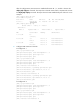
4. Establish an EBGP peer relationship between PE and CE switches to exchange VPN routes:
# Configure CE 1.
[CE1] bgp 65410
[CE1-bgp] peer 2001:1::1 as-number 100
[CE1-bgp] ipv6-family unicast
[CE1-bgp-ipv6] peer 2001:1::1 enable
[CE1-bgp-ipv6] import-route direct
[CE1-bgp-ipv6] quit
# Configure PE 1.
[PE1] bgp 100
[PE1-bgp] ip vpn-instance vpn1
[PE1-bgp-vpn1] peer 2001:1::2 as-number 65410
[PE1-bgp-vpn1] ipv6-family unicast
[PE1-bgp-ipv6-vpn1] peer 2001:1::2 enable
[PE1-bgp-ipv6-vpn1] import-route direct
[PE1-bgp-ipv6-vpn1] quit
[PE1-bgp-vpn1] quit
[PE1-bgp] quit
# Configure CE 2 and PE 2 in the same way that CE 1 and PE 1 are configured. (Details not
shown.)
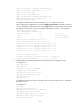
After completing the configurations, execute the display bgp peer ipv6 vpn-instance command on
the PEs. The output shows that BGP peer relationships have been established between PEs and CEs
and have reached the Established state.
Take PE 1 as an example:
[PE1] display bgp vpnv6 vpn-instance vpn1 peer
BGP local router ID : 1.1.1.9
Local AS number : 100
Total number of peers : 1 Peers in established state : 1
Peer AS MsgRcvd MsgSent OutQ PrefRcv Up/Down State
2001:1::1 65410 5 5 0 1 00:02:03 Established
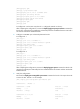
5. Establish an MP-IBGP peer relationship between the PEs:
# Configure PE 1.
[PE1] bgp 100
[PE1-bgp] peer 2.2.2.9 as-number 100
[PE1-bgp] peer 2.2.2.9 connect-interface loopback 0