
R21xx-HP FlexFabric 11900 MPLS Configuration Guide

17
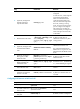
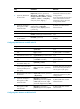
Ste
p
Command
Remarks
1. Enter system view.
system-view N/A
2. Enable BGP and enter BGP
view.
bgp as-number By default, BGP is not enabled.
3. Enter BGP-VPN instance view.
ip vpn-instance vpn-instance-name
N/A
4. Specify the PE as an IBGP
peer.
peer { group-name | ip-address }
[ as-number as-number ]
By default, no BGP peer or peer
group is specified.
5. Create and enter BGP-VPN
IPv4 address family view.
ipv4-family [ unicast ] N/A
6. Enable BGP to exchange IPv4
unicast routing information
with the specified peer or
peer group.
peer { group-name | ip-address }
enable
By default, BGP does not exchange
IPv4 unicast routing information
with any peer or peer group.
7. Redistribute the VPN routes of
the VPN site.
import-route protocol [ { process-id
| all-processes } [ med med-value |
route-policy route-policy-name ] * ]
By default, BGP does not
redistribute routes from any other
routing protocol.
8. (Optional.) Configure a
filtering policy to filter
advertised routes.
filter-policy { acl-number |
prefix-list prefix-list-name } export
[ protocol process-id ]
By default, BGP does not filter
advertised routes.
9. (Optional.) Configure a
filtering policy to filter
received routes.
filter-policy { acl-number |
prefix-list prefix-list-name } import
By default, BGP does not filter
received routes.
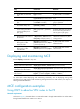
Displaying and maintaining MCE
Execute display commands in any view.
Task Command
Display VPN instance information. display ip vpn-instance [ instance-name vpn-instance-name ]
Display BGP peer group
information for a VPN instance.
display bgp group ipv4 vpn-instance vpn-instance-name [ group-name ]
Display BGP peer information for a
VPN instance.
display bgp peer ipv4 vpn-instance vpn-instance-name [ group-name
log-info | ip-address { log-info | verbose } | verbose ]
For other MCE related displaying and maintaining commands, such as displaying routing table
information for a VPN instance and maintaining routing sessions for a VPN instance, see Layer 3—IP
Routing Command Reference.
MCE configuration examples
Using OSPF to advertise VPN routes to the PE
Network requirements
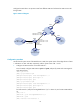
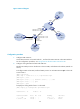
As shown in Figure 4, the MCE device is connected to VPN 1 through VLAN-interface 10 and to VPN 2
through VLAN-interface 20. OSPF runs in VPN 2.