
R21xx-HP FlexFabric 11900 MPLS Configuration Guide


227
• Remote connection—To create a remote connection, configure an AC, configure a PW in
cross-connect view, and bind the AC with the PW in cross-connect view.
• Multi-segment PW—To create a multi-segment PW, configure two PWs and bind the two PWs in
cross-connect view.
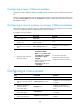
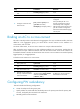
To configure MPLS L2VPN on a PE:
Tasks at a
g
lance
Remarks
(Required.) Enabling L2VPN N/A
(Required.) Configuring an AC:
• Configuring a Layer 2 Ethernet interface
• Configuring a service instance on a Layer 2 Ethernet interface
Choose either task depending
on the AC type.
For multi-segment PWs, skip this
task.
(Required.) Configuring a cross-connect N/A
Configuring a PW:
• (Optional.) Configuring a PW class
• (Required.) Choose either of the following tasks to configure a PW:
{ Configuring a static PW
{ Configuring an LDP PW
Choose a PW configuration
method depending on the MPLS
L2VPN implementation.
Skip these tasks for local
connection configuration.
(Required.) Binding an AC to a cross-connect
Choose either task to bind an
AC to a cross-connect.
For multi-segment PWs, skip this
task.
(Optional.) Configuring PW redundancy:
• Configure static PW redundancy
• Configure LDP PW redundancy
Choose either task to configure
PW redundancy.
Enabling L2VPN
Perform this task to enable L2VPN so the PE can support MPLS L2VPN.
Before you perform this task, configure an LSR ID for the PE with the mpls lsr-id command, and enable
MPLS with the mpls enable command on the backbone interface of the PE. For more information about
these commands, see MPLS Command Reference.
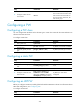
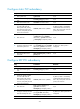
To enable L2VPN:
Ste
p
Command
Remarks
1. Enter system view. system-view N/A
2. Enable L2VPN.
l2vpn enable By default, L2VPN is disabled.
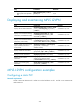
Configuring an AC
An AC can be a Layer 2 Ethernet interface or a service instance on a Layer 2 Ethernet interface.