
R21xx-HP FlexFabric 11900 MPLS Configuration Guide


231
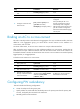
Configure static PW redundancy
Ste
p
Command
Remarks
1. Enter system view.
system-view N/A
2. Enter cross-connect group
view.
xconnect-group group-name N/A
3. Enter cross-connect view.
connection connection-name N/A
4. (Optional.) Specify whether
to switch traffic from the
backup PW to the primary
PW when the primary PW
recovers, and specify the wait
time for the switchover.
revertive { wtr wtr-time | never }
By default, traffic is immediately
switched back from the backup
PW to the primary PW when the
primary PW recovers.
5. Enter PW view.
peer ip-address pw-id pw-id
[ in-label label-value out-label
label-value ] [ pw-class class-name
| tunnel-policy tunnel-policy-name ]
*
N/A
6. Configure a backup PW and
enter backup PW view.
backup-peer ip-address pw-id
pw-id in-label label-value out-label
label-value [ pw-class class-name |
tunnel-policy tunnel-policy-name ] *
By default, no backup PW is
configured.
7. Return to user view.
return N/A
8. Manually perform a PW
switchover.
l2vpn switchover peer ip-address
pw-id pw-id
N/A
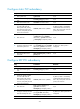
Configure LDP PW redundancy
Ste
p
Command
Remarks
1. Enter system view. system-view N/A
2. Enter cross-connect group
view.
xconnect-group group-name N/A
3. Enter cross-connect view.
connection connection-name N/A
4. (Optional.) Specify whether
to switch traffic from the
backup PW to the primary
PW when the primary PW
recovers, and specify the wait
time for the switchover.
revertive { wtr wtr-time | never }
By default, traffic is immediately
switched back from the backup
PW to the primary PW when the
primary PW recovers.
5. Enter PW view.
peer ip-address pw-id pw-id
[ pw-class class-name |
tunnel-policy tunnel-policy-name ] *
N/A
6. Configure a backup LDP PW
and enter backup PW view.
backup-peer ip-address pw-id
pw-id [ pw-class class-name |
tunnel-policy tunnel-policy-name ] *
By default, no backup LDP PW is
configured.
7. Return to user view.
return N/A