
R21xx-HP FlexFabric 11900 MPLS Configuration Guide

236
5.
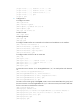
Configure CE 2:
<CE2> system-view
[CE2] interface ten-gigabitethernet 1/0/1
[CE2-Ten-GigabitEthernet1/0/1] port link-type trunk
[CE2-Ten-GigabitEthernet1/0/1] port trunk permit vlan 10
[CE2-Ten-GigabitEthernet1/0/1] quit
Verify the configuration
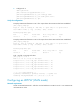
# Display L2VPN PW information on PE 1. The output shows that a static PW has been established.
[PE1] display l2vpn pw
Flags: M - main, B - backup, H - hub link, S - spoke link, N - no split horizon
Total number of PWs: 1, 1 up, 0 blocked, 0 down, 0 defect
Xconnect-group Name: vpna
Peer PW ID In/Out Label Proto Flag Link ID State
192.3.3.3 3 100/200 Static M 0 Up
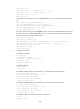
# Display L2VPN PW information on PE 2. The output shows that a static PW has been established.
[PE2] display l2vpn pw
Flags: M - main, B - backup, H - hub link, S - spoke link, N - no split horizon
Total number of PWs: 1, 1 up, 0 blocked, 0 down, 0 defect
Xconnect-group Name: vpna
Peer PW ID In/Out Label Proto Flag Link ID State
192.2.2.2 3 200/100 Static M 0 Up
# CE 1 and CE 2 can ping each other.
[CE1] ping 100.1.1.2
PING 100.1.1.2 (100.1.1.2): 56 data bytes
56 bytes from 100.1.1.2: icmp_seq=0 ttl=255 time=3.000 ms
56 bytes from 100.1.1.2: icmp_seq=1 ttl=255 time=3.000 ms
56 bytes from 100.1.1.2: icmp_seq=2 ttl=255 time=2.000 ms
56 bytes from 100.1.1.2: icmp_seq=3 ttl=255 time=3.000 ms
56 bytes from 100.1.1.2: icmp_seq=4 ttl=255 time=3.000 ms
--- 100.1.1.2 ping statistics ---
5 packet(s) transmitted, 5 packet(s) received, 0.0% packet loss
round-trip min/avg/max/stddev = 2.000/2.800/3.000/0.400 ms
Configuring an LDP PW (VLAN mode)
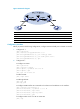
Network requirements
Create an LDP PW between PE 1 and PE 2 over the backbone so VLAN 10 on CE 1 can communicate
with VLAN 20 on CE 2.