
R21xx-HP FlexFabric 11900 MPLS Configuration Guide

266
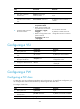
Configuring a static PW
Ste
p
Command
Remarks
1. Enter system view.
system-view N/A
2. Enter VSI view.
vsi vsi-name N/A
3. Configure the VSI to
establish a static PW,
and enter VSI static view.
pwsignaling static
By default, no PW signaling protocol is
specified.
4. Configure a VPLS PW
and enter VSI static PW
view.
peer ip-address pw-id pw-id
in-label label-value out-label
label-value [ pw-class
class-name | tunnel-policy
tunnel-policy-name ] *
By default, no VPLS PW is configured.
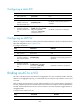
Configuring an LDP PW
Before you configure an LDP PW, enable global and interface MPLS LDP on the PE. For information about
MPLS LDP configuration, see "Configuring LDP."
T
o configure an LDP PW:
Ste
p
Command
Remarks
1. Enter system view.
system-view N/A
2. Enter VSI view.
vsi vsi-name N/A
3. Configure the VSI to
use LDP to establish a
PW, and enter VSI LDP
view.
pwsignaling ldp
By default, no PW signaling protocol is
specified.
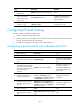
4. Configure a VPLS PW
and enter VSI LDP PW
view.
peer ip-address pw-id pw-id [ hub |
no-split-horizon | pw-class
class-name | tunnel-policy
tunnel-policy-name ] *
By default, no LDP PW is configured.
Binding an AC to a VSI
This task is mutually exclusive with Ethernet link aggregation. If a Layer 2 Ethernet interface has been
added to a link aggregation group, you cannot bind a service instance on the interface to a VSI, and
vice versa.
After you bind a service instance on a Layer 2 Ethernet interface to a VSI, packets that are received from
the Layer 2 Ethernet interface and meet the match criteria of the service instance are forwarded based on
the MAC address table bound to the VSI. A service instance can match all packets, tagged packets, or
untagged packets.
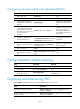
To bind a service instance to a VSI:
Ste
p
Command
Remarks
1. Enter system view.
system-view
N/A