
R21xx-HP FlexFabric 11900 MPLS Configuration Guide

268
Configuring a dual-homed PE with redundant LDP PWs
Ste
p
Command
Remarks
1. Enter system view.
system-view N/A
2. Enter VSI view.
vsi vsi-name N/A
3. Configure the VSI to LDP to
establish PWs, and enter VSI
LDP view.
pwsignaling ldp
By default, no PW signaling
protocol is specified for the
VSI.
4. (Optional.) Specify whether to
switch traffic from the backup
PW to the primary PW when
the primary PW recovers, and
the wait time for the
switchover.
revertive { wtr wtr-time | never }
By default, when the primary
PW recovers, traffic is
immediately switched back
from the backup PW to the
primary PW.
5. Configure a VPLS PW and
enter VSI LDP PW view.
peer ip-address pw-id pw-id
[ no-split-horizon | pw-class class-name
| tunnel-policy tunnel-policy-name ] *
By default, no VPLS PW is
configured.
6. Configure a backup VPLS PW
and enter VSI LDP backup PW
view.
backup-peer ip-address pw-id pw-id
[ pw-class class-name | tunnel-policy
tunnel-policy-name ] *
By default, no backup VPLS
PW is configured.
7. Return to user view.
return N/A
8. Manually switch traffic of the
specified PW to its backup
PW.
l2vpn switchover peer ip-address pw-id
pw-id
N/A
Configuring MAC address learning
Step Command Remarks
1. Enter system view.
system-view N/A
2. Enter VSI view.
vsi vsi-name [ hub-spoke ] N/A
3. Enable MAC address
learning for the VSI.
mac-learning enable
By default, MAC address learning is
enabled for a VSI.
Displaying and maintaining VPLS
Execute display commands in any view and the reset command in user view.
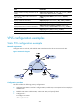
Task Command
Display LDP PW label information.
display l2vpn ldp [ peer ip-address [ pw-id pw-id ] | vsi
vsi-name ] [ verbose ]
Display L2VPN forwarding information (in
standalone mode).
display l2vpn forwarding { ac | pw } [ vsi vsi-name ] [ slot
slot-number ] [ verbose ]