
R21xx-HP FlexFabric 11900 MPLS Configuration Guide

73
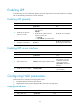
Configuring LDP GR
Before you configure LDP GR, enable LDP on the GR restarter and GR helpers.
To configure LDP GR:
Ste
p
Command
Remarks
1. Enter system view.
system-view N/A
2. Enter LDP view.
mpls ldp N/A
3. Enable LDP GR.
graceful-restart By default, LDP GR is disabled.
4. Configure the Reconnect
timer for LDP GR.
graceful-restart timer reconnect
reconnect-time
By default, the Reconnect time is
120 seconds.
5. Configure the MPLS
Forwarding State Holding
timer for LDP GR.
graceful-restart timer forwarding-hold
hold-time
By default, the MPLS Forwarding
State Holding time is 180 seconds.
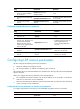
Resetting LDP sessions
Changes to LDP session parameters, except the MD5 authentication key, do not take effect on existing
LDP sessions. To validate the changes, you must reset the LDP sessions.
Execute the reset mpls ldp command in user view.
Task Command
Reset LDP sessions. reset mpls ldp [ vpn-instance vpn-instance-name ] [ peer peer-id ]
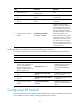
Displaying and maintaining LDP
Execute display commands in any view.
Task Command
Display LDP discovery information.
display mpls ldp discovery [ vpn-instance vpn-instance-name ]
[ interface interface-type interface-number | peer peer-lsr-id |
targeted-peer peer-lsr-id ] [ verbose ]
Display LDP FEC-label mapping
information.
display mpls ldp fec [ vpn-instance vpn-instance-name ]
[ destination-address mask-length | summary ]
Display LDP interface information. display mpls ldp interface [ interface-type interface-number ]
Display LDP LSP information.
display mpls ldp lsp [ vpn-instance vpn-instance-name ]
[ destination-address mask-length ]
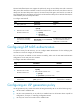
Display LDP running parameters. display mpls ldp parameter [ vpn-instance vpn-instance-name ]
Display LDP peer and session
information.
display mpls ldp peer [ vpn-instance vpn-instance-name ]
[ peer-lsr-id ] [ verbose ]
Display LDP summary information. display mpls ldp summary [ all | vpn-instance vpn-instance-name ]