
R21xx-HP FlexFabric 11900 MPLS Configuration Guide

81
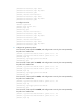
[SwitchC-ldp] quit
6. Verify the configuration:
# Execute the display mpls ldp lsp command on each switch to view the LDP LSP information. For
example, on Switch A:
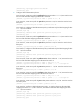
[SwitchA] display mpls ldp lsp
Status Flags: * - stale, L - liberal
Statistics:
FECs: 2 Ingress LSPs: 1 Transit LSPs: 1 Egress LSPs: 1
FEC In/Out Label Nexthop OutInterface
11.1.1.0/24 1277/-
-/1148(L)
21.1.1.0/24 -/1149(L)
-/1276 10.1.1.2 Vlan-int2
1276/1276 10.1.1.2 Vlan-int2
The output shows that the next hop of the LSP for FEC 21.1.1.0/24 is Switch B (10.1.1.2). The LSP
has been set up over the link Switch A—Switch B—Switch C, not over the link Switch A—Switch
D—Switch C.
Label advertisement control configuration example
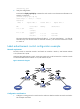
Network requirements
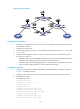
Two links, Switch A—Switch B—Switch C and Switch A—Switch D—Switch C, exist between subnets
11.1.1.0 / 24 a n d 21.1.1. 0 / 24 .
Configure label advertisement control, so LDP sets up LSPs only on the link Switch A—Switch B—Switch
C to forward traffic between subnets 11.1.1.0 / 24 a n d 21.1.1. 0 / 24 .
Figure 24 Network diagram
Configuration considerations
1. Configure a routing protocol on each switch to make sure that the switches can reach each other.
This example uses OSPF.