
R21xx-HP FlexFabric 11900 MPLS Configuration Guide

86
Configuring tunnel policies
Overview
Tunnel policies enable a PE to forward traffic for each MPLS VPN over multiple LSP tunnels to achieve
load sharing when the PE has multiple tunnels to the peer PE.
For more information about MPLS VPNs, see "Configuring MPLS L3VPN."
Configuring a tunnel policy
To select multiple tunnels for load sharing, create a tunnel policy and specify the number of tunnels by
using the select-seq load-balance-number command.
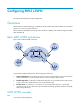
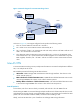
As shown in Figure 25, P
E 1 and PE 2 have three tunnels in between and they connect to multiple MPLS
VPNs. To achieve load sharing over the three tunnels for each VPN, configure one tunnel policy, use the
select-seq load-balance-number command to specify the number of tunnels for load balancing as three,
and apply the tunnel policy to each MPLS VPN.
Figure 25 MPLS VPN tunnel selection diagram
To configure a tunnel policy:
Ste
p
Command
Remarks
1. Enter system view.
system-view N/A
2. Create a tunnel policy,
and enter tunnel policy
view.
tunnel-policy tunnel-policy-name
By default, no tunnel policy is
configured.
3. Configure the number
of tunnels for load
sharing.
select-seq lsp load-balance-number
number
The default number is 1.