
R21xx-HP FlexFabric 11900 Network Management and Monitoring Command Reference


110
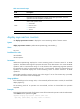
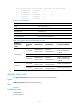
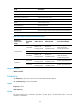
Table 29 Command output
Field Description
Index History record ID.
Response
Round-trip time if the operation succeeds, timeout time upon timeout, or 0 if the
operation cannot be completed, in milliseconds.
Status
Status of the operation result:
• Succeeded
• Unknown error
• Internal error
• Timeout:
Time Time when the operation was completed.
display nqa reaction counters
Use display nqa reaction counters to display the current monitoring results of reaction entries.
Syntax
display nqa reaction counters [ admin-name operation-tag [ item-number ] ]
Views
Any view
Predefined user roles
network-admin
network-operator
Parameters
admin-name operation-tag: Displays the current monitoring results of reaction entries for an NQA
operation. The admin-name argument represents the name of the administrator who creates the NQA
operation, and is a case-insensitive string of 1 to 32 characters. The operation-tag argument represents
the operation tag, and is a case-insensitive string of 1 to 32 characters. If these two arguments are not
specified, the command displays the current monitoring results of reaction entries for all NQA
operations.
item-number: Specifies a reaction entry by its ID, in the range of 1 to 10. If no reaction entry is provided,
the results of all reaction entries are displayed.
Usage guidelines
If the threshold type is the average value, or the monitored performance metric is ICPIF, the result fields
display hyphens (-).
The monitoring results of an operation are accumulated, and are not cleared after the operation
completes.
Examples
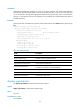
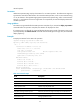
# Display the monitoring results of all reaction entries of the ICMP echo operation with the administrator
name admin and the operation tag test.
<Sysname> display nqa reaction counters admin test
NQA entry (admin admin, tag test) reaction counters: