
R21xx-HP FlexFabric 11900 Network Management and Monitoring Command Reference


112
Parameters
admin-name operation-tag: Displays the result of an NQA operation. The admin-name argument
represents the name of the administrator who creates the NQA operation, and is a case-insensitive string
of 1 to 32 characters. The operation-tag argument represents the operation tag, and is a case-insensitive
string of 1 to 32 characters. If these two arguments are not specified, the command displays the result of
all NQA operations.
Examples
# Display the result of the UDP echo operation with the administrator name admin and the operation tag
test.
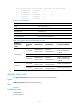
<Sysname> display nqa result admin test
NQA entry (admin admin, tag test) test results:
Destination IP address: 192.168.0.58
Send operation times: 1 Receive response times: 1
Min/Max/Average round trip time: 3/3/3
Square-Sum of round trip time: 9
Last succeeded probe time: 2011-01-01 03:15:12.6
Extended results:
Packet loss in test: 0%
Failures due to timeout: 0
Failures due to internal error: 0
Failures due to other errors: 0
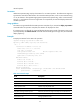
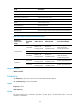
Table 32 Command output
Field Descri
p
tion
Send operation times Number of operations.
Receive response times Number of response packets received.
Min/Max/Average round trip time Minimum/maximum/average round-trip time in milliseconds.
Square-Sum of round trip time Square sum of round-trip time.
Last succeeded probe time
Time when the last successful probe was completed. If no probes are
successful in an operation, the field displays 0.
Packet loss in test Average packet loss ratio.
Failures due to internal error Number of failures due to internal errors.
Failures due to other errors Failures due to other errors.
display nqa statistics
Use display nqa statistics to display NQA operation statistics.
Syntax
display nqa statistics [ admin-name operation-tag ]
Views
Any view
Predefined user roles
network-admin