
R21xx-HP FlexFabric 11900 Network Management and Monitoring Command Reference



171
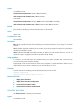
monitor process [ dumbtty ] [ iteration number ] [ slot slot-number ]
In IRF mode:
monitor process [ dumbtty ] [ iteration number ] [ chassis chassis-number slot slot-number ]
Views
Any view
Predefined user roles
network-admin
Parameters
dumbtty: Specifies dumbtty mode. In this mode, the command displays process statistics in descending
order of CPU usage without refreshing statistics. If you do not specify this keyword, the command
displays statistics for the top 10 processes in descending order of CPU usage in an interactive mode, and
refreshes statistics every 5 seconds by default.
iteration number: Specifies the number of display times, in the range of 1 to 4294967295. If you specify
the dumbtty keyword, the number argument is 1 by default. If neither the dumbtty keyword nor the
number argument is specified, there is no limit to the display times and process statistics are refreshed
every 5 seconds.
slot slot-number: Specifies a card by its slot number. Without this option, the command displays process
statistics for the active MPU. (In standalone mode.)
chassis chassis-number slot slot-number: Specifies a card on an IRF member device. Without this option,
the command displays process statistics for the global active MPU. (In IRF mode.)
Usage guidelines
If you do not specify the dumbtty keyword, the command displays process statistics in an interactive
mode. In this mode, the system automatically determines the number of displayed processes according
to the screen size, and does not display exceeding processes. You can also input interactive commands
as shown in Table 46 to per
form relevant operations.
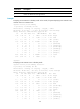
Table 46 Interactive commands
Commands Descri
p
tion
? or h Displays help information that includes available interactive commands.
c Sorts processes by CPU usage in descending order, which is the default setting.
d
Sets the interval for refreshing process statistics, in the range of 1 to 2147483647 seconds.
The default value is 5 seconds.
f
Sorts processes by the number of open files in descending order. Files are identified by file
descriptors (FDs).
k Kills a process. Because the command can impact system operation, be cautious to use it.
l Refreshes the screen.
m Sorts processes by memory usage in descending order.
n
Changes the maximum number of processes displayed within a screen, in the range of 0 to
2147483647. The default value is 10. A value of 0 means no limit. Only processes not
exceeding the screen size can be displayed.
q Quits the interactive mode.
t Sorts processes by running time in descending order.