
R21xx-HP FlexFabric 11900 Network Management and Monitoring Command Reference


182
Port mirroring commands
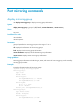
display mirroring-group
Use display mirroring-group to display mirroring group information.
Syntax
display mirroring-group { group-id | all | local | remote-destination | remote-source }
Views
Any view
Predefined user roles
network-admin
network-operator
Parameters
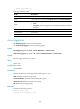
group-id: Specifies the mirroring group ID in the range of 1 to 4.
all: Displays the information of all mirroring groups.
local: Displays local mirroring group information.
remote-destination: Displays remote destination group information.
remote-source: Displays remote source group information.
Usage guidelines
Mirroring group information includes the type, status, and content of a mirroring group, and is sorted by
mirroring group number.
Examples
# Display information about all mirroring groups.
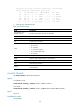
<Sysname> display mirroring-group all
Mirroring group 3:
Type: Local
Status: Active
Mirroring port:
Ten-GigabitEthernet1/0/1 Inbound
Ten-GigabitEthernet1/0/2 Both
Mirroring CPU:
Slot 1, 2, 3 Both
Slot 4 Inbound
Monitor port: Ten-GigabitEthernet1/0/3
Mirroring group 4:
Type: Remote source
Status: Incomplete
Mirroring port:
Ten-GigabitEthernet1/0/4 Both