
R21xx-HP FlexFabric 11900 Network Management and Monitoring Command Reference

192
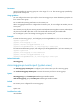
Default
No remote probe VLAN is configured for a mirroring group.
Views
System view
Predefined user roles
network-admin
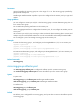
Parameters
group-id: Specifies the mirroring group ID in the range of 1 to 4. The mirroring group specified by
group-id must already exist.
vlan-id: Specifies a VLAN by its ID.
Usage guidelines
You can configure a remote probe VLAN only for a remote source group or remote destination group but
not for a local mirroring group.
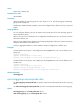
When a VLAN is configured as a remote probe VLAN, use the remote probe VLAN for port mirroring
exclusively.
The remote mirroring groups on the source device and destination device must use the same remote
probe VLAN.
Only a static VLAN that already exists can be configured as a remote probe VLAN. A VLAN can be
configured as the remote probe VLAN for only one mirroring group.
To delete a VLAN that is configured as a remote probe VLAN, remove the remote probe VLAN
configuration first.
Examples
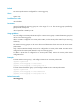
# Create remote source group 1, and configure VLAN 10 as its remote probe VLAN.
<Sysname> system-view
[Sysname] mirroring-group 1 remote-source
[Sysname] mirroring-group 1 remote-probe vlan 10
# Create remote destination group 2, and configure VLAN 20 as its remote probe VLAN.
<Sysname> system-view
[Sysname] mirroring-group 2 remote-destination
[Sysname] mirroring-group 2 remote-probe vlan 20
Related commands
mirroring-group