
R21xx-HP FlexFabric 11900 Network Management and Monitoring Command Reference

29
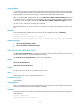
• ntp-service authentication-keyid
• ntp-service reliable authentication-keyid
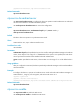
ntp-service ipv6 inbound disable
Use ntp-service ipv6 inbound disable to disable an interface from receiving IPv6 NTP messages.
Use undo ntp-service ipv6 inbound disable to restore the default.
Syntax
ntp-service ipv6 inbound disable
undo ntp-service ipv6 inbound disable
Default
All interfaces are enabled to receive IPv6 NTP messages.
Views
VLAN interface view, Layer 3 Ethernet interface view
Predefined user roles
network-admin
Usage guidelines
To disable an interface on the device from synchronizing the peer devices in the corresponding subnet or
disable the device from being synchronized by the peer devices in the subnet corresponding to an
interface, execute the command on the interface.
Examples
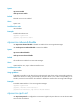
# Disable VLAN-interface 1 from receiving IPv6 NTP messages.
<Sysname> system-view
[Sysname] interface vlan-interface 1
[Sysname-Vlan-interface1] ntp-service ipv6 inbound disable
ntp-service ipv6 multicast-client
Use ntp-service ipv6 multicast-client to configure the device to operate in IPv6 NTP multicast client mode
and use the current interface to receive IPv6 NTP multicast packets.
Use undo ntp-service ipv6 multicast-client to remove the configuration.
Syntax
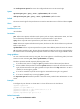
ntp-service ipv6 multicast-client ipv6-multicast-address
undo ntp-service ipv6 multicast-client ipv6-multicast-address
Default
The device does not operate in any NTP association mode.
View
VLAN interface view, Layer 3 Ethernet interface view
Predefined user roles
network-admin