
R21xx-HP FlexFabric 11900 Network Management and Monitoring Command Reference




63
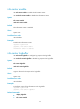
info-center source
Use info-center source to configure a log output rule for a module.
Use undo info-center source to restore the default.
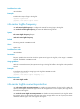
Syntax
info-center source { module-name | default } { console | logbuffer | logfile | loghost | monitor } { deny
| level severity }
undo info-center source { module-name | default } { console | logbuffer | logfile | loghost | monitor }
Default
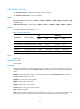
The default output rules are listed in Table 17.
Table 17 Default output rules
Destination Source modules
Lo
g
Hidden lo
g
Status Level Status Level
Console All supported modules
Enabled Debug Disabled N/A
Monitor terminal All supported modules
Enabled Debug Disabled N/A
Log host All supported modules
Enabled Informational Enabled Informational
Log buffer All supported modules
Enabled Informational Enabled Informational
Log file All supported modules
Enabled Informational Enabled Informational
Views
System view
Predefined user roles
network-admin
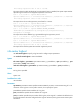
Parameters
module-name: Specifies a module by its name. For instance, to output FTP information, specify this
argument as FTP. You can use the info-center source ? command to view the modules supported by the
device.
default: Specifies all modules, which can be displayed by using the info-center source ? command.
console: Outputs logs to the console.
logbuffer: Outputs logs to the log buffer.
logfile: Outputs logs to the log file.
loghost: Outputs logs to the log host.
monitor: Outputs logs to the monitor terminal.
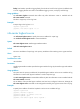
deny: Disables log output.
level severity: Specifies a severity level, in the range of 0 to 7. See Table 13 fo
r more information. With
this keyword, you can specify the lowest severity level of the logs allowed/denied to be output.