
R21xx-HP FlexFabric 11900 Network Management and Monitoring Command Reference



64
Usage guidelines
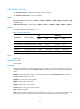
This command sets an output rule for a specified module or all modules. For example, you can output IP
log information with a severity of at least warning to the log host, and output IP log information with a
severity of at least informational to the log buffer.
If you do not set an output rule for a module, the module uses the default output rule or the output rule set
by using the default keyword.
If you use the command multiple times, only the most recent output rule takes effect for the specified
module.
After you set an output rule for a module, you must use the module-name argument to modify or remove
the rule. A new output rule configured by using the default keyword does not take effect on the module.
Examples
# Output only VLAN module's information with a severity level of at least emergency to the console.
<Sysname> system-view
[Sysname] info-center source default console deny
[Sysname] info-center source vlan console level emergency
# Based on the previous configuration, disable the output of VLAN module's information to the console.
<Sysname> system-view
[Sysname] undo info-center source vlan console
info-center synchronous
Use info-center synchronous to enable synchronous information output.
Use undo info-center synchronous to disable synchronous information output.
Syntax
info-center synchronous
undo info-center synchronous
Default
Synchronous information output is disabled.
Views
System view
Predefined user roles
network-admin
Usage guidelines
The output of system logs interrupts ongoing configuration operations, and you have to find the
previously input commands before the logs. Synchronous information output can show the previous input
after log output and a command prompt in command editing mode, or a [Y/N] string in interaction
mode so you can continue your operation from where you were stopped.
Examples
# Enable synchronous information output, and then issue the display current-configuration command to
view the current configuration of the device.
<Sysname> system-view
[Sysname] info-center synchronous