
R21xx-HP FlexFabric 11900 Network Management and Monitoring Command Reference
66
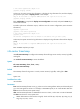
• DD: Date, starting with a space if it is less than 10, for example " 7".
• hh:mm:ss:xxx: Local time, with hh ranging from 00 to 23, mm and ss ranging from 00 to 59, and
xxx ranging from 0 to 999.
• YYYY: Year.
none: Indicates no time information is provided.
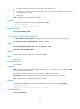
Examples
# Configure the timestamp format for log information as boot.
<Sysname> system-view
[Sysname] info-center timestamp boot
Related commands
info-center timestamp loghost
info-center timestamp loghost
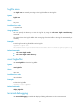
Use info-center timestamp loghost to configure the timestamp format for logs sent to the log host.
Use undo info-center timestamp loghost to restore the default.
Syntax
info-center timestamp loghost { date | iso | no-year-date | none }
undo info-center timestamp loghost
Default
The timestamp format for logs sent to the log host is date.
Views
System view
Predefined user roles
network-admin
Parameters
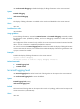
date: Sets the timestamp format as "mmm dd hh:mm:ss yyyy", such as Dec 8 10:12:21 2007. The date
time shows the current system time.
iso: Sets the ISO 8601 timestamp format, for example, 2009-09-21T15:32:55.
no-year-date: Sets the timestamp format as the current system date and time without year.
none: Indicates that no timestamp information is provided.
Examples
# Configure the timestamp format for system information sent to the log host as no-year-date.
<Sysname> system-view
[Sysname] info-center timestamp loghost no-year-date
Related commands
info-center timestamp