
R21xx-HP FlexFabric 11900 Network Management and Monitoring Configuration Guide



93
# Start the UDP echo operation.
[DeviceA] nqa schedule admin test1 start-time now lifetime forever
# Stop the UDP echo operation after a period of time.
[DeviceA] undo nqa schedule admin test1
# Display the results of the UDP echo operation.
[DeviceA] display nqa result admin test1
NQA entry (admin admin, tag test1) test results:
Send operation times: 1 Receive response times: 1
Min/Max/Average round trip time: 25/25/25
Square-Sum of round trip time: 625
Last succeeded probe time: 2011-11-22 10:36:17.9
Extended results:
Packet loss ratio: 0%
Failures due to timeout: 0
Failures due to internal error: 0
Failures due to other errors: 0
# Display the history records of the UDP echo operation.
[DeviceA] display nqa history admin test1
NQA entry (admin admin, tag test1) history records:
Index Response Status Time
1 25 Succeeded 2011-11-22 10:36:17.9
The output shows that the round-trip time between Device A and port 8000 on Device B is 25
milliseconds.
NQA collaboration configuration example
Network requirements
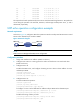
As shown in Figure 33, configure a static route to Switch C with Switch B as the next hop on Switch A.
Associate the static route, a track entry, and an ICMP operation to monitor the state of the static route.
Figure 33 Network diagram
Configuration procedure
1. Assign each interface an IP address. (Details not shown.)
2. On Switch A, configure a unicast static route and associate the static route with a track entry:
# Configure a static route, and associate the static route with track entry 1.
<SwitchA> system-view