
R21xx-HP FlexFabric 11900 Network Management and Monitoring Configuration Guide






110
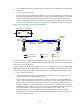
Figure 38 Layer 3 remote port mirroring implementation
Configuring local port mirroring
Local port mirroring takes effect only when the source ports or CPUs, and the monitor port are
configured.
Local port mirroring configuration task list
Tasks at a
g
lance
1. (Required.) Creating a local mirroring group
2. (Required.) Perform at least one of the following tasks:
{ Configuring source ports for the local mirroring group
{ Configuring source CPUs for the local mirroring group
3. (Required.) Configuring the monitor port for the local mirroring group
Creating a local mirroring group
Ste
p
Command
Remarks
1. Enter system view.
system-view N/A
2. Create a local mirroring
group.
mirroring-group group-id local
By default, no local mirroring
group exists.
Configuring source ports for the local mirroring group
You can configure a list of source ports for a mirroring group at a time in system view, or assign a port
to it as a source port in interface view. To assign multiple ports to the mirroring group as source ports in
interface view, repeat the operation.
Configuration restrictions and guidelines
• A mirroring group can contain multiple source ports.
XGE1/0/1
Data monitoring
device
IP network
GRE tunnel
Tunnel interface
Source
device
Destination
device
Host
XGE1/0/2 XGE1/0/1
XGE1/0/2
Tunnel interface
Source port Monitor portOriginal packets
Common portMirrored packets