
R21xx-HP FlexFabric 11900 Network Management and Monitoring Configuration Guide




112
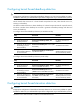
• Use a monitor port for port mirroring only to make sure the data monitoring device receives and
analyzes only the mirrored traffic rather than a mix of mirrored traffic and normally forwarded
traffic.
Configuration procedure
To configure the monitor port in system view:
Ste
p
Command
Remarks
1. Enter system view.
system-view N/A
2. Configure the monitor port for
the specified local mirroring
group.
mirroring-group group-id
monitor-port interface-type
interface-number
By default, no monitor port is
configured for a local mirroring
group.
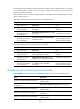
To configure the monitor port in interface view:
Ste
p
Command
Remarks
1. Enter system view.
system-view N/A
2. Enter interface view.
interface interface-type
interface-number
N/A
3. Configure the port as the
monitor port for the specified
mirroring group.
mirroring-group group-id
monitor-port
By default, a port does not serve as
the monitor port for any local
mirroring group.
Using the remote probe VLAN to enable local mirroring to
support multiple monitor ports
In typical local port mirroring configuration, you can configure only one monitor port in a local mirroring
group. As a result, you cannot monitor traffic of a local device on multiple data monitoring devices. To
do that, take advantage of the remote probe VLAN used in Layer 2 remote mirroring.
In Layer 2 remote port mirroring, a remote probe VLAN is configured, and the mirrored packets are
broadcast within the remote probe VLAN. By connecting multiple data monitoring devices to the remote
probe VLAN's member ports, you can monitor the local device's traffic on multiple data monitoring
devices.
Configure this feature by following these steps:
1. Configure a remote source mirroring group on the local device.
2. Configure the monitored ports on the device as source ports of this mirroring group.
3. Configure a remote probe VLAN for this mirroring group.
4. Assign the ports connecting the data monitoring devices to the remote probe VLAN.
In this way, when packets mirrored on the monitored ports are broadcast in the remote probe VLAN, they
are sent out of the ports connecting the data monitoring devices, and all data monitoring devices can
thus receive these mirrored packets.