
R21xx-HP FlexFabric 11900 Network Management and Monitoring Configuration Guide




113
Configuration restrictions and guidelines
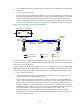
• The reflector port of a remote source mirroring group must be an access port and belong to the
default VLAN, VLAN 1.
• HP recommends that you configure an unused port as the reflector port of a remote source mirroring
group and disable spanning tree on it.
• Do not configure a combo interface as a reflector port.
• A mirroring group can contain multiple source ports.
• To make sure the port mirroring function works properly, do not assign a source port to the remote
probe VLAN.
• If you have already configured a reflector port for a remote source mirroring group, you can no
longer configure an egress port for it.
• A VLAN can serve as the remote probe VLAN for only one remote source mirroring group. HP
recommends that you use the remote probe VLAN for port mirroring exclusively. Do not create a
VLAN interface for the VLAN or configure any other features for the VLAN.
• A remote probe VLAN must be a static VLAN. To remove the VLAN configured as a remote probe
VLAN, you must first remove the remote probe VLAN with the undo mirroring-group remote-probe
vlan command.
• If the remote probe VLAN of a remote mirroring group is removed, the remote mirroring group will
become invalid.
• The link type of monitor ports configured for port mirroring must be access.
Configuration procedure
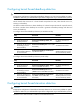
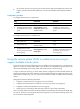
To configure local port mirroring with multiple monitor ports:
Ste
p
Command
Remarks
1. Enter system view.
system-view N/A
2. Create a remote source
mirroring group.
mirroring-group group-id
remote-source
By default, no mirroring group exists
on a device.
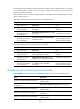
3. Configure source ports
for the remote source
mirroring group.
• (Method 1) In system view:
mirroring-group group-id
mirroring-port mirroring-port-list
{ both | inbound | outbound }
• (Method 2) In interface view:
a. interface interface-type
interface-number
b. mirroring-group group-id
mirroring-port { both |
inbound | outbound }
c. quit
Use either method.
By default, no source port is
configured for a mirroring group.
4. Configure the reflector
port for the remote
source mirroring group.
mirroring-group group-id reflector-port
reflector-port
By default, no reflector port is
configured for a mirroring group.
5. Create the remote probe
VLAN and enter VLAN
view.
vlan vlan-id
By default, no remote probe VLAN is
configured for a mirroring group.
6. Assign monitor ports to
the remote probe VLAN.
port interface-list
By default, a newly-created VLAN
does not have any member port.