
R21xx-HP FlexFabric 11900 Network Management and Monitoring Configuration Guide

114
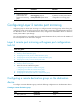
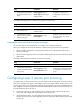
Ste
p
Command
Remarks
7. Return to system view.
quit N/A
8. Configure the remote
probe VLAN for the
remote source mirroring
group.
mirroring-group group-id
remote-probe vlan rprobe-vlan-id
By default, no remote probe VLAN is
configured for a mirroring group.
Configuring Layer 2 remote port mirroring
Configuring Layer 2 remote port mirroring is to configure remote mirroring groups. When doing this,
configure a remote source group on the source device and a cooperating remote destination group on
the destination device. If intermediate devices exist, configure the intermediate devices to allow the
remote probe VLAN to pass through.
For a mirrored packet to successfully arrive at the remote destination device, make sure the VLAN ID of
the mirrored packet is not removed or changed.
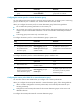
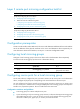
Layer 2 remote port mirroring with egress port configuration
task list
Tasks at a
g
lance
(Required.) Configuring a remote destination group on the destination device:
1. Creating a remote destination group
2. Configuring the monitor port for a remote destination group
3. Configuring the remote probe VLAN for a remote destination group
4. Assigning the monitor port to the remote probe VLAN
(Required.) Configuring a remote source group on the source device:
5. Creating a remote source group
6. P
erform at least one of the following tasks:
{ Configuring source ports for a remote source group
{ Configuring source CPUs for a remote source group
7. Configuring the egress port for a remote source group
8. Configuring the remote probe VLAN for a remote source group
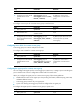
Configuring a remote destination group on the destination
device
To configure a remote destination group, make the following configurations on the destination device.
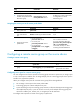
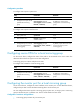
Creating a remote destination group
Ste
p
Command
Remarks
1. Enter system view.
system-view N/A