
R21xx-HP FlexFabric 11900 Network Management and Monitoring Configuration Guide

116
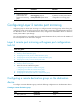
Ste
p
Command
Remarks
1. Enter system view.
system-view N/A
2. Configure the remote probe
VLAN for the specified remote
destination group.
mirroring-group group-id
remote-probe vlan vlan-id
By default, no remote probe VLAN
is configured for a remote
destination group.
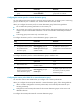
Assigning the monitor port to the remote probe VLAN
Ste
p
Command
Remarks
1. Enter system view.
system-view N/A
2. Enter the interface
view of the monitor
port.
interface interface-type interface-number N/A
3. Assign the port to the
probe VLAN.
• For an access port:
port access vlan vlan-id
• For a trunk port:
port trunk permit vlan vlan-id
• For a hybrid port:
port hybrid vlan vlan-id { tagged |
untagged }
Use one of the commands.
For more information about the
port access vlan, port trunk permit
vlan, and port hybrid vlan
commands, see Layer 2—LAN
Switching Command Reference.
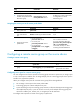
Configuring a remote source group on the source device
Creating a remote source group
Ste
p
Command
Remarks
1. Enter system view.
system-view N/A
2. Create a remote source
group.
mirroring-group group-id remote-source
By default, no remote source
group exists on a device.
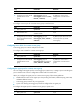
Configuring source ports for a remote source group
You can configure a list of source ports for a mirroring group at a time in system view, or assign a port
to it as a source port in interface view. To assign multiple ports to a mirroring group as source ports in
interface view, repeat the operation.
When you configure source ports for a remote source group, follow these guidelines:
• Do not assign a source port to the remote probe VLAN.
• A mirroring group can contain multiple source ports.
• A port can belong to only one mirroring group. However, on devices that support mirroring groups
with multiple monitor ports, a port can serve as a source port for multiple mirroring groups, but
cannot be a reflector port, monitor port, or an egress port at the same time.
To configure source ports for a remote source group in system view: