
R21xx-HP FlexFabric 11900 Network Management and Monitoring Configuration Guide




119
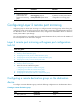
Layer 3 remote port mirroring configuration task list
Tasks at a
g
lance
(Required.) Configuring the source device:
1. Configuring local mirroring groups
2. Perform at least one of the following tasks:
{ Configuring source ports for a local mirroring group
{ Configuring source CPUs for a local mirroring group
3. Configuring the monitor port for a local mirroring group
(Required.) Configuring the destination device:
4. Configuring local mirroring groups
5. Configuring source ports for a local mirroring group
6. Configuring the monitor port for a local mirroring group
Configuration prerequisites
Create a tunnel interface and a GRE tunnel. The source and destination addresses of the tunnel interface
are the IP addresses of the physical interfaces on the source and destination devices respectively. For
more information about tunnel interfaces, see Layer 3—IP Services Configuration Guide.
Configuring local mirroring groups
Configure a local mirroring group on the source device and on the destination device separately.
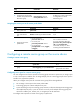
To create a local mirroring group (on the source or destination device):
Ste
p
Command
Remarks
1. Enter system view.
system-view N/A
2. Create a local mirroring
group.
mirroring-group group-id local
By default, no local mirroring
group exists on a device.
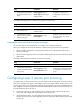
Configuring source ports for a local mirroring group
On the source device, configure the ports you want to monitor as the source ports. On the destination
device, configure the physical port corresponding to the tunnel interface as the source port.
You can configure a list of source ports for a mirroring group at a time in system view, or assign a port
to it as a source port in interface view. To assign multiple ports to the mirroring group as source ports in
interface view, repeat the operation. The two modes lead to the same result.
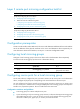
Configuration restrictions and guidelines
• A mirroring group can contain multiple source ports.
• A port can belong to only one mirroring group. However, on devices that support mirroring groups
with multiple monitor ports, a port can serve as a source port for multiple mirroring groups, but
cannot be a reflector port, egress port, or monitor port at the same time.