
R21xx-HP FlexFabric 11900 Network Management and Monitoring Configuration Guide

120
Configuration procedure
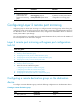
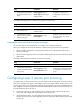
To configure source ports in system view:
Ste
p
Command
Remarks
1. Enter system view.
system-view N/A
2. Configure source ports for the
specified local mirroring
group.
mirroring-group group-id
mirroring-port interface-list { both |
inbound | outbound }
By default, no source port is
configured for a local mirroring
group.
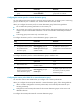
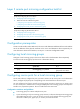
To configure source ports in interface view:
Ste
p
Command
Remarks
1. Enter system view.
system-view N/A
2. Enter interface view.
interface interface-type
interface-number
N/A
3. Configure the port as a source
port for the specified local
mirroring group.
mirroring-group group-id
mirroring-port { both | inbound |
outbound }
By default, a port does not serve as
a source port for any local
mirroring group.
Configuring source CPUs for a local mirroring group
On the source device, configure the CPUs of the cards to be monitored as the source CPUs. The
destination device does not support source CPU configuration.
A mirroring group can contain multiple source CPUs.
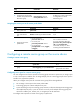
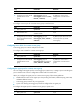
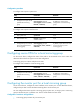
To configure source CPUs for a local mirroring group:
Ste
p
Command
Remarks
1. Enter system view.
system-view N/A
2. Configure source CPUs for the
specified local mirroring
group.
mirroring-group group-id
mirroring-cpu slot slot-number-list
{ both | inbound | outbound }
By default, no source CPU is
configured for a local mirroring
group.
Configuring the monitor port for a local mirroring group
On the source device, configure the tunnel interface as the monitor port. On the destination device,
configure the port that connects the data monitoring device as the monitor port.
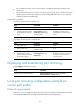
You can configure the monitor port for a mirroring group in system view, or assign a port to a mirroring
group as the monitor port in interface view. The two modes lead to the same result.
Configuration restrictions and guidelines
• A mirroring group contains only one monitor port.