
R21xx-HP FlexFabric 11900 Network Management and Monitoring Configuration Guide





124
Mirroring group 1:
Type: Local
Status: Active
Mirroring CPU:
Slot 1 Both
Monitor port: Ten-GigabitEthernet1/0/3
After the configurations are completed, you can monitor on the server all the packets received and sent
by the marketing department and the technical department and processed by the CPU of the card in slot
1 of the device.
Local port mirroring with multiple monitor ports
configuration example
Network requirements
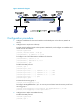
As shown in Figure 41, Dept. A, Dept. B, and Dept. C are connected to Device A through ports
Ten-GigabitEthernet 1/0/1, Ten-GigabitEthernet 1/0/2, and Ten-GigabitEthernet 1/0/3, respectively.
Configure port mirroring to enable all three data monitoring devices (Server A, Server B, and Server C)
to monitor both the incoming and outgoing traffic of the three departments.
Figure 41 Network diagram
Configuration procedure
# Create remote source mirroring group 1.
<DeviceA> system-view
[DeviceA] mirroring-group 1 remote-source
# Configure Ten-GigabitEthernet 1/0/1 through Ten-GigabitEthernet 1/0/3 as source ports of remote
source mirroring group 1.
[DeviceA] mirroring-group 1 mirroring-port ten-gigabitethernet 1/0/1 to
ten-gigabitethernet 1/0/3 both
Dept. A
Dept. B
Dept. C
DeviceA
ServerA
ServerB
ServerC
XGE1/0/3
XGE1/0/2
XGE1/0/1
XGE1/0/11
XGE1/0/12
XGE1/0/13