
R21xx-HP FlexFabric 11900 Network Management and Monitoring Configuration Guide




127
[DeviceA] mirroring-group 1 mirroring-port ten-gigabitethernet 1/0/1 both
[DeviceA] mirroring-group 1 monitor-egress ten-gigabitethernet 1/0/2
# Configure port Ten-GigabitEthernet 1/0/2 as a trunk port to permit the packets of VLAN 2 to
pass through, and disable the spanning tree feature on the port.
[DeviceA] interface ten-gigabitethernet 1/0/2
[DeviceA-Ten-GigabitEthernet1/0/2] port link-type trunk
[DeviceA-Ten-GigabitEthernet1/0/2] port trunk permit vlan 2
[DeviceA-Ten-GigabitEthernet1/0/2] undo stp enable
[DeviceA-Ten-GigabitEthernet1/0/2] quit
Verifying the configuration
# Display information about all mirroring groups on Device A.
[DeviceA] display mirroring-group all
Mirroring group 1:
Type: Remote source
Status: Active
Mirroring port:
Ten-GigabitEthernet1/0/1 Both
Remote probe VLAN: 2
# Display information about all mirroring groups on Device C.
[DeviceC] display mirroring-group all
Mirroring group 2:
Type: Remote destination
Status: Active
Monitor port: Ten-GigabitEthernet1/0/2
Remote probe VLAN: 2
After the configurations are completed, you can monitor all the packets received and sent by the
marketing department on the server.
Layer 3 remote port mirroring configuration
example
Network requirements
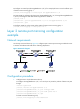
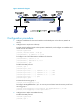
On a Layer 3 network shown in Figure 43, configure Layer 3 remote port mirroring and create a GRE
tunnel to enable the server to monitor the bidirectional traffic of the marketing department through a GRE
tunnel.