
R21xx-HP FlexFabric 11900 Network Management and Monitoring Configuration Guide


134
• Configuring remote source group—Uses the egress port to be the monitor port (port A). For more
information, see "Configuring a remote source group on the source device."
To prevent pa
ckets received or sent by the source port from being mirrored to the destination
device through the remote source group, HP recommends that you use an unused interface as the
source port of the remote source group.
Configuring remote traffic mirroring on the destination device
You only need to configure a remote destination group on the destination device. For more information,
see "Configuring a remote destination group on the destination device."
Local traffic mirroring configuration example
Network requirements
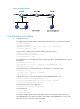
As shown in Figure 44, different departments of a company use IP addresses on different subnets. The
marketing and technical departments use the IP addresses on subnets 192.168.1.0/24 and
192.168.2.0/24, respectively. The working hour of the company is from 8:00 to 18:00 on weekdays.
Configure traffic mirroring so that the server can monitor the traffic that the technical department sends
to access the Internet, and IP traffic that the technical department sends to the marketing department.
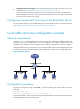
Figure 44 Network diagram
Configuration procedure
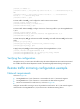
# Create a working hour range named work, in which the working hour is from 8:00 to 18:00 on
weekdays.
<DeviceA> system-view
[DeviceA] time-range work 8:00 to 18:00 working-day
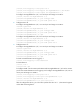
# Create ACL 3000 to allow packets from the technical department to access the Internet and to the
marketing department during working hours.