
R21xx-HP FlexFabric 11900 Network Management and Monitoring Configuration Guide

135
[DeviceA] acl number 3000
[DeviceA-acl-adv-3000] rule permit tcp source 192.168.2.0 0.0.0.255 destination-port eq
www
[DeviceA-acl-adv-3000] rule permit ip source 192.168.2.0 0.0.0.255 destination
192.168.1.0 0.0.0.255 time-range work
[DeviceA-acl-adv-3000] quit
# Create traffic class tech_c, and configure the match criterion as ACL 3000.
[DeviceA] traffic classifier tech_c
[DeviceA-classifier-tech_c] if-match acl 3000
[DeviceA-classifier-tech_c] quit
# Create traffic behavior tech_b, configure the action of mirroring traffic to port Ten-GigabitEthernet
1/0/3.
[DeviceA] traffic behavior tech_b
[DeviceA-behavior-tech_b] mirror-to interface ten-gigabitethernet 1/0/3
[DeviceA-behavior-tech_b] quit
# Create QoS policy tech_p, and associate traffic class tech_c with traffic behavior tech_b in the QoS
policy.
[DeviceA] qos policy tech_p
[DeviceA-qospolicy-tech_p] classifier tech_c behavior tech_b
[DeviceA-qospolicy-tech_p] quit
# Apply QoS policy tech_p to the incoming packets of Ten-GigabitEthernet 1/0/4.
[DeviceA] interface ten-gigabitethernet 1/0/4
[DeviceA-Ten-GigabitEthernet1/0/4] qos apply policy tech_p inbound
[DeviceA-Ten-GigabitEthernet1/0/4] quit
Verifying the configuration
Through the server, you can monitor all traffic sent by the technical department to access the Internet and
the IP traffic that the technical department sends to the marketing department during working hours.
Remote traffic mirroring configuration example
Network requirements
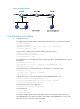
As shown in Figure 45:
• Ten-GigabitEthernet 1/0/2 of Device A is connected to the 10.1.1.1/24 network segment.
• Ten-GigabitEthernet 1/0/2 of Device C is connected to the data monitoring device.
• Device B connects Device A and Device C, as shown in Figure 45.
C
onfigure remote traffic mirroring to mirror the packets that are from the 10.1.1.1/24 network segment
and received on Ten-GigabitEthernet 1/0/2 of Device A to the data monitoring device.