
R21xx-HP FlexFabric 11900 Network Management and Monitoring Configuration Guide


136
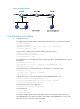
Figure 45 Network diagram
Configuration procedure
1. Configure Device A:
# Configure basic IPv4 ACL 2000 to match packets from the 10.1.1.1/24 network segment.
<DeviceA> system-view
[DeviceA] acl number 2000
[DeviceA-acl-basic-2000] rule permit source 10.1.1.1 255.255.255.0
[DeviceA-acl-basic-2000] quit
# Create class 1 and use basic IPv4 ACL 2000 as the match criteria.
[DeviceA] traffic classifier 1
[DeviceA-classifier-1] if-match acl 2000
[DeviceA-classifier-1] quit
# Create behavior 1 and configure the action of mirroring traffic to Ten-GigabitEthernet 1/0/1 for
the behavior.
[DeviceA] traffic behavior 1
[DeviceA-behavior-1] mirror-to interface Ten-GigabitEthernet 1/0/1
[DeviceA-behavior-1] quit
# Create QoS policy 1 and associate class 1 with behavior 1 in the QoS policy.
[DeviceA] qos policy 1
[DeviceA-policy-1] classifier 1 behavior 1
[DeviceA-policy-1] quit
# Apply QoS policy 1 to the inbound direction of Ten-GigabitEthernet 1/0/2.
[DeviceA] interface Ten-GigabitEthernet 1/0/2
[DeviceA-Ten-GigabitEthernet1/0/2] qos apply policy 1 inbound
[DeviceA-Ten-GigabitEthernet1/0/2] quit
# Create remote source mirroring group 1.
[DeviceA] mirroring-group 1 remote-source
# Create VLAN 2.
[DeviceA] vlan 2
[DeviceA-vlan2] quit
# Configure VLAN 2 as the remote probe VLAN, select an unused port as the source port
(Ten-GigabitEthernet 1/0/48, for example), and configure Ten-GigabitEthernet 1/0/1 as the
egress port for the remote source mirroring group.