
R21xx-HP FlexFabric 11900 Network Management and Monitoring Configuration Guide

26
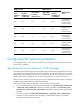
Perform this task to restrict the number of dynamic associations to prevent dynamic associations from
occupying too many system resources.
To configure the maximum number of dynamic associations:
Ste
p
Command
Remarks
1. Enter system view.
system-view N/A
2. Configure the maximum
number of dynamic sessions
allowed to be established.
ntp-service max-dynamic-sessions
number
By default, the command can
establish up to 100 dynamic
sessions.
Configuring the local clock as a reference source
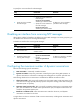
Follow these guidelines when you configure the local clock as a reference source:
• After you configure the local clock as a reference source, the local clock is synchronized, and can
operate as a time server to synchronize other devices in the network. If the local clock is incorrect,
time errors may occur. Use this feature with caution.
• Before you configure this feature, adjust the local system time to make sure it is accurate.
• When you configure the system time and NTP at the same time, the device uses the time
synchronized from the NTP server as the system time.
To configure the local clock as a reference source:
Ste
p
Command
Remarks
1. Enter system view.
system-view N/A
2. Configure the local clock as a
reference source.
ntp-service refclock-master
[ ip-address ] [ stratum ]
By default, the device does not use
the local clock as a reference
source.
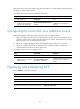
Displaying and maintaining NTP
Execute display commands in any view.
Task Command
Display information about NTP service status. display ntp-service status
Display information about IPv4 NTP associations. display ntp-service sessions [ verbose ]
Display information about IPv6 NTP associations. display ntp-service ipv6 sessions [ verbose ]
Display brief information about the NTP servers from
the local device back to the primary reference source.
display ntp-service trace