
R21xx-HP FlexFabric 11900 Network Management and Monitoring Configuration Guide


34
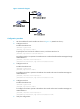
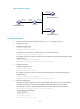
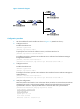
Figure 13 Network diagram
Configuration procedure
1. Set the IP address for each interface as shown in Figure 13. (Details not shown.)
2. Configure Switch C:
# Enable the NTP service.
<SwitchC> system-view
[SwitchC] ntp-service enable
# Specify the local clock as the reference source, with the stratum level 2.
[SwitchC] ntp-service refclock-master 2
# Configure Switch C to operate in broadcast server mode and send broadcast messages through
VLAN-interface 2.
[SwitchC] interface vlan-interface 2
[SwitchC-Vlan-interface2] ntp-service broadcast-server
3. Configure Switch A:
# Enable the NTP service.
<SwitchA> system-view
[SwitchA] ntp-service enable
# Configure Switch A to operate in broadcast client mode and receive broadcast messages on
VLAN-interface 2.
[SwitchA] interface vlan-interface 2
[SwitchA-Vlan-interface2] ntp-service broadcast-client
4. Configure Switch B:
# Enable the NTP service.
<SwitchB> system-view
[SwitchB] ntp-service enable
# Configure Switch B to operate in broadcast client mode and receive broadcast messages on
VLAN-interface 2.
[SwitchB] interface vlan-interface 2
[SwitchB-Vlan-interface2] ntp-service broadcast-client
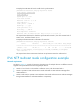
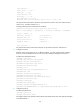
5. Verify the configuration: