
R21xx-HP FlexFabric 11900 Network Management and Monitoring Configuration Guide




55
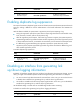
Severity
v
alue
Level Description
4 Warning
Warning condition. For example, an interface is disconnected, or the memory
resources are used up.
5 Notification
Normal but significant condition. For example, a terminal logs in to the device,
or the device reboots.
6 Informational
Informational message. For example, a command or a ping operation is
executed.
7 Debug Debug message.
Log destinations
The system outputs logs to the following destinations: console, monitor terminal, log buffer, log host, and
log file. Log output destinations are independent and you can configure them after enabling the
information center.
Default log output rules
A default output rule specifies the log source modules and severity level for an output destination. Logs
matching the output rule are output to the destination. Table 7 sh
ows the default output rules.
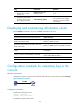
Table 7 Default output rules
Destination Lo
g
source modules
Out
p
ut switch
Severit
y
Console All supported modules Enabled Debug
Monitor terminal All supported modules Disabled Debug
Log host All supported modules Enabled Informational
Log buffer All supported modules Enabled Informational
Log file All supported modules Enabled Informational
Log format
The format of logs varies with output destinations. Table 8 shows the original format of log information,
which might be different from what you see. The actual format depends on the log resolution tool used.
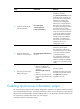
Table 8 Log formats
Output destination Format Example
Console, monitor
terminal, log buffer, or
log file
Prefix Timestamp Sysname
Module/Level/Digest: Content
%Nov 24 14:21:43:502 2010 HP
SYSLOG/6/SYSLOG_RESTART:
System restarted –-
HP Comware Software.