
R21xx-HP FlexFabric 11900 Network Management and Monitoring Configuration Guide




57
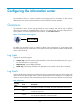
Table 10 Timestamp precisions and configuration commands
Item Destined to the log host
Destined to the console, monitor
terminal, lo
g
buffer, and lo
g
file
Precision Seconds Milliseconds
Command
used to set the
timestamp
format
info-center timestamp loghost info-center timestamp
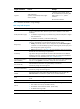
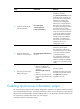
Table 11 Description of the timestamp parameters
Timestamp
p
arameters
Description Example
boot
Time that has elapsed since system startup, in
the format of xxx.yyy. xxx represents the
higher 32 bits, and yyy represents the lower
32 bits, of milliseconds elapsed.
Logs that are sent to all destinations other than
the log host support this parameter.
%0.109391473 Sysname
FTPD/5/FTPD_LOGIN: User ftp
(192.168.1.23) has logged in
successfully.
0.109391473 is a timestamp in the boot
format.
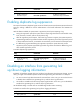
date
Current date and time, in the format of MMM
DD hh:mm:ss:xxx YYY.
All logs support this parameter.
%May 30 05:36:29:579 2003 Sysname
FTPD/5/FTPD_LOGIN: User ftp
(192.168.1.23) has logged in
successfully.
May 30 05:36:29:579 2003 is a
timestamp in the date format.
iso
Timestamp format stipulated in ISO 8601.
Only logs that are sent to the log host support
this parameter.
<189>2003-05-30T06:42:44
Sysname %%10FTPD/5/FTPD_LOGIN(l):
User ftp (192.168.1.23) has logged in
successfully.
2003-05-30T06:42:44 is a timestamp in
the iso format.
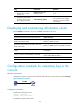
none
No timestamp is included.
All logs support this parameter.
% Sysname FTPD/5/FTPD_LOGIN: User
ftp (192.168.1.23) has logged in
successfully.
No timestamp is included.
no-year-date
Current date and time without year
information, in the format of MMM DD
hh:mm:ss:xxx.
Only logs that are sent to the log host support
this parameter.
<189>May 30 06:44:22
Sysname %%10FTPD/5/FTPD_LOGIN(l):
User ftp (192.168.1.23) has logged in
successfully.
May 30 06:44:22 is a timestamp in the
no-year-date format.
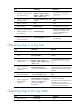
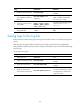
Information center configuration task list
Task at a
g
lance
Perform at least one of the followin
g
tasks: